Mechanical keyboards are one of those gaming upgrades that actually feels good. Not just because they sound cool (they do), but because the tactile feedback genuinely helps your accuracy and comfort.
But here’s the thing: there are like 500 switch types now, and most gamers have no idea what the differences actually mean. Let’s cut through the noise.
What makes a mechanical keyboard worth buying?
Unlike membrane keyboards that feel mushy and require bottoming out to register a keystroke, mechanical keyboards have individual switches under each key. Each switch is its own world.
The result: Better feedback, faster actuation, durability that lasts years, and honestly… they just feel better to use.
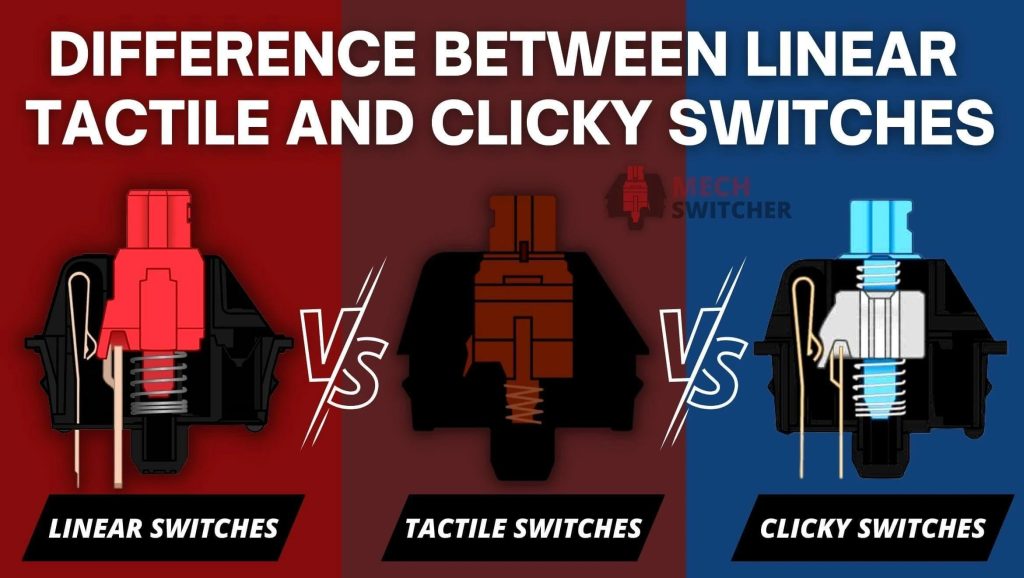
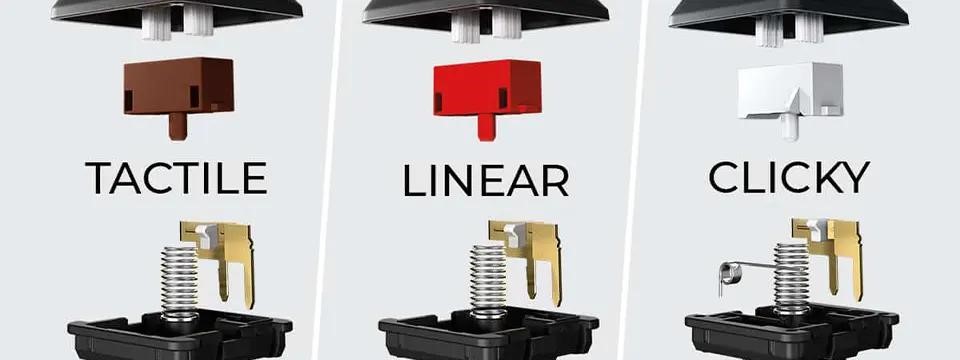
The three types of switches (simplified)
Linear switches (for speed)
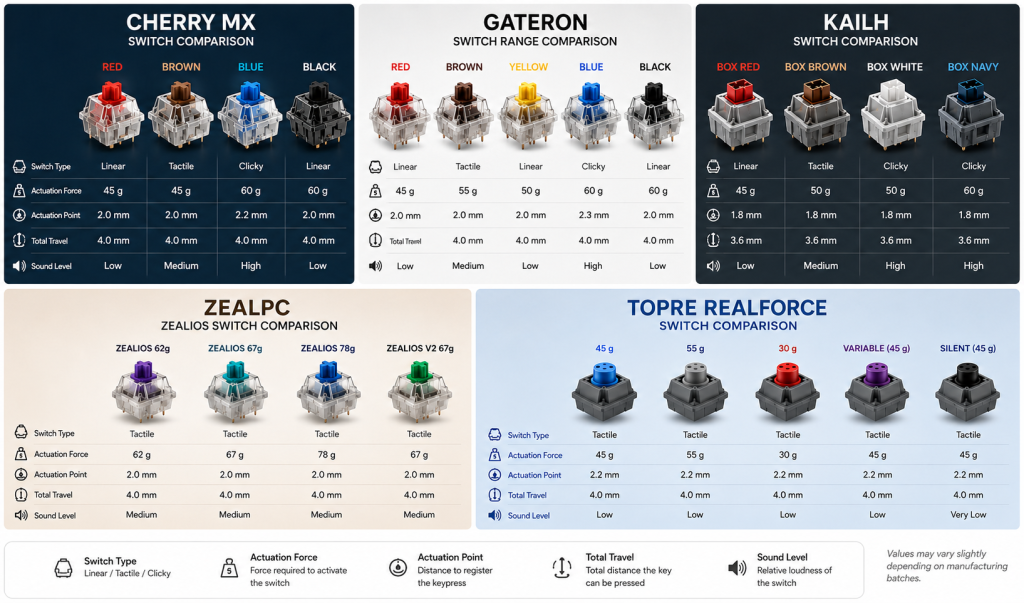
Linear switches go straight down. No bump, no click. They’re smooth as silk. Popular for fast-paced gaming because there’s zero resistance—you get consistent key presses every time.
- Cherry MX Red (the classic, 45g actuation force)
- Gateron Yellow (smoother, slightly cheaper)
- Razer Yellow (proprietary, but similar feel)
- OP1 Studio (newer option, very smooth)
Best for: Esports (Valorant, CS2), fast-twitch games, people who want a smooth, responsive feel.
Tactile switches (for feedback)
Tactile switches have a bump in the middle. When you hit the bump, you feel and hear a slight click. You get feedback without the loud noise of a clicky switch.
- Cherry MX Brown (balanced, still common)
- Zealios (premium option, very tactile)
- Durock POM (underrated, great value)
- Kailh BOX Royal (unique bump, very satisfying)
Best for: Gaming + typing (streamers, content creators), people who want feedback without being obnoxiously loud.
Clicky switches (for noise)
Clicky switches have a bump AND they make an audible “click” sound. Satisfying? Yes. Loud? Also yes. Will your teammate rage? Possibly.
- Cherry MX Blue (the classic clicky, very loud)
- Outemu Blue (budget clicky, less quality)
- Jwick Switch (newer clicky option)
- Kailh Box White (high-pitched, distinctive)
Best for: Single-player gaming, streams where you want audio feedback, people who live alone (or whose teammates are very patient).
What “actuation force” means (and why it matters)
Actuation force is how hard you have to press a key for it to register. Measured in grams (g). Lower = easier to press. Higher = more resistance, less chance of accidental presses.
Common ranges:
40-45g = light, fast (esports, streaming)
45-60g = medium, balanced (gaming + typing)
60-70g = heavy, less prone to accidental presses (typing-focused)
I built a keyboard for streaming with 45g switches. I could hit keys super fast, but I’d accidentally trigger abilities mid-game. Switched to 55g and suddenly I had way better control. The difference is real.
Stabilizers (the boring but important part)
Large keys like spacebar, shift, and enter need stabilizers or they’ll rattle and feel mushy. This is where most keyboards cheap out.
Good stabilizers = clean, smooth spacebar. Bad stabilizers = wobble and rattle.
Look for:
Stabilizers that are “lubed” or pre-lubed (smooth feel)
Plate-mounted stabilizers (more secure)
Screw-in stabilizers (even better, you can adjust them)
Pro tip: Most gaming keyboards have mediocre stabilizers. If you buy a mechanical keyboard and the spacebar feels weird, it’s probably the stabilizers. This is an easy fix (lube them yourself or replace them).
The best mechanical switches in 2026
Best for esports (pure speed)
Cherry MX Red or Gateron Yellow
Linear, 45g, fast. Cherry Red is the standard. Gateron Yellow is cheaper and arguably smoother. Either choice is proven in professional esports. You won’t find a pro using anything else at this level.
Best for balance (gaming + typing)
Cherry MX Brown or Durock POM
Tactile, 55g, balanced. Brown is the safe choice—it’s in everything. Durock POM is newer and honestly better quality for less money. If you game AND type, pick one of these.
Best for streaming/content creation
Kailh BOX Royal or Zealios
Tactile, satisfying bump, quieter than clicky but more feedback than linear. Viewers can hear you but it doesn’t sound like a typewriter. Great for long sessions.
Best budget option
Gateron Yellow (linear) or Durock POM (tactile)
Both are $3-6 per switch instead of $10+. Quality is solid. Performance is nearly identical to premium switches. No reason to pay more unless you want specific aesthetics.
Keyboard board options
The “board” is the circuit and housing. Switches go into it. Quality matters here too.
Budget boards ($80-150)
- Keychron C2 (wireless option, solid build)
- Gateron SK Halo (good switches + decent board)
- Royal Kludge RK61 (compact, hotswap)
Mid-range boards ($150-300)
- Corsair K65 Plus (premium feel, great stabilizers)
- SteelSeries Apex Pro (customizable per-key)
- Ducky One 3 (excellent QC, reliable)
Premium boards ($300+)
- Drop Alt High Profile (custom case, hotswap)
- KBDfans Tofu (aluminum case, authentic build)
- Owllab Owlstudio (enthusiast tier, custom quality)
Honestly? For gaming, a $150 board with quality switches beats a $300 board with cheap switches. The switches matter way more than the case.
Hotswap vs soldered (why it matters)
Hotswap keyboards let you pull out switches and replace them. Soldered keyboards require a soldering iron to change switches.
Hotswap pros: You can experiment with different switches, replace broken ones easily.
Hotswap cons: Slightly more expensive, can be slightly less stable.
For gaming in 2026, hotswap is the way to go. You might want to try different switches. Don’t lock yourself into one switch forever.
RGB lighting (bonus, not essential)
Most gaming keyboards have RGB lighting now. It looks cool, but it doesn’t help you aim better. It’s a nice-to-have, not a must-have.
My take: If the keyboard has RGB, cool. If not, save the $30 and spend it on better switches instead.
Final thoughts: Picking your mechanical keyboard
Checklist for deciding:
- What type of switch? (Linear for speed, Tactile for balance, Clicky for feedback)
- What actuation force? (45g for fast, 55g for balanced)
- Hotswap or soldered? (Hotswap is better in 2026)
- What’s your budget? ($100+ is worth it, $200+ is luxury)
- Do you care about RGB? (Nice to have, not necessary)
- Ergonomics matter? (Split keyboards, wrist rests help long sessions)
Once you answer those questions, you’ve basically picked your keyboard. There’s no single “best” keyboard—there’s only the best keyboard for you.
Pro final thought: Your keyboard is something you touch 1000+ times a day. It’s worth spending $150-200 on something that feels amazing. You’ll use it for years. Quality here pays dividends.